Dein Mac.Your Mac.Tu Mac.
Nur einen Tipp entfernt.Just one tap away.A un solo toque.
TentDeck macht dein iPhone oder iPad zum Steuerdeck für deinen Mac. Ein Tipp startet eine App, führt einen Kurzbefehl aus, drückt ein Tastenkürzel oder steuert die Musik – und auf dem faltbaren iPhone steht das Deck wie ein Zelt neben deiner Tastatur.TentDeck turns your iPhone or iPad into a control deck for your Mac. One tap launches an app, runs a Shortcut, presses a keyboard shortcut or controls your music – and on a foldable iPhone the deck stands like a tent next to your keyboard.TentDeck convierte tu iPhone o iPad en un panel de control para tu Mac. Un toque abre una app, ejecuta un atajo, pulsa una combinación de teclas o controla la música; y en un iPhone plegable el panel se sostiene como una tienda junto a tu teclado.
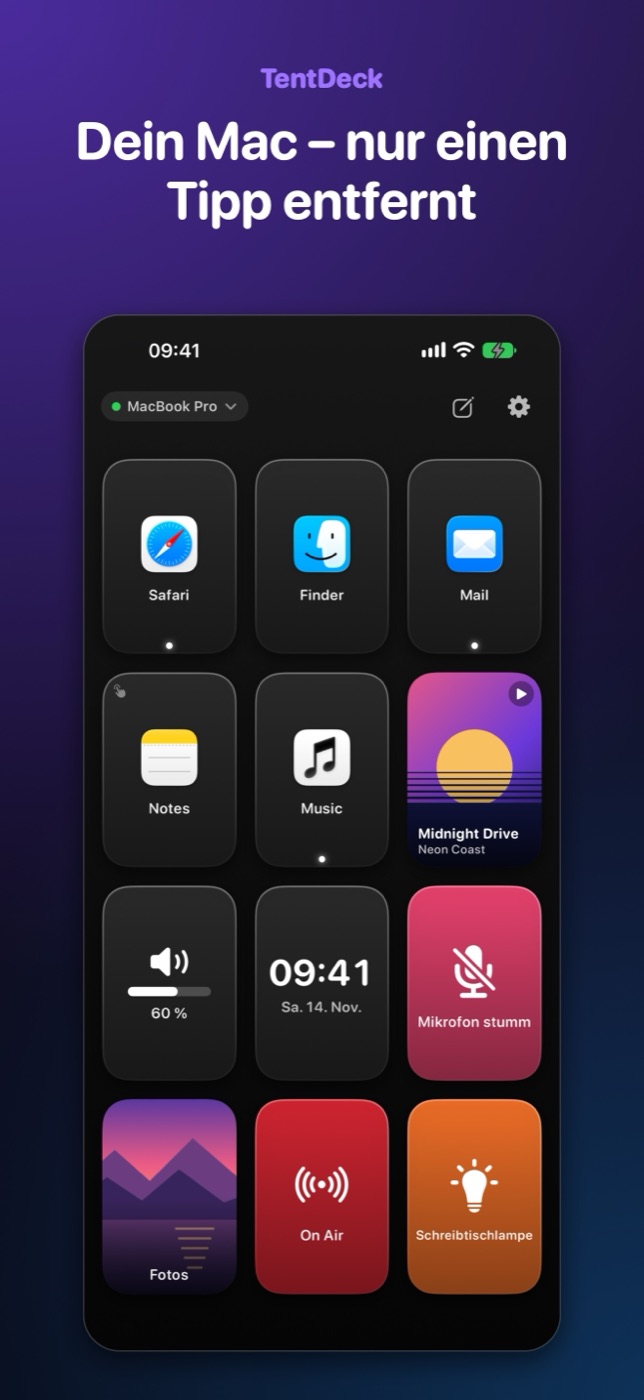 🔍 Zum Vergrößern klickenClick to enlargeHaz clic para ampliar
Dein Deck auf einen BlickYour deck at a glanceTu panel de un vistazo
Echte App-Icons, Symbole und Farben auf großen Tasten. Ein Tipp – und dein Mac reagiert sofort.Real app icons, symbols and colors on big keys. One tap – and your Mac responds instantly.Iconos reales de apps, símbolos y colores en teclas grandes. Un toque y tu Mac responde al instante.
- Live: laufender Titel mit Cover, Lautstärke, Uhrzeit, laufende Apps und stummes MikrofonLive: current track with cover art, volume, time, running apps and a muted micEn directo: canción actual con carátula, volumen, hora, apps abiertas y micrófono silenciado
- Mehrere Seiten – einfach wischenSeveral pages – just swipeVarias páginas: solo desliza
- Haptisches Feedback bei jedem DruckHaptic feedback on every pressRespuesta háptica en cada pulsación
Zeltmodus auf dem faltbaren iPhoneTent mode on a foldable iPhoneModo tienda en el iPhone plegable
Falte dein iPhone zum Zelt und stell es neben die Tastatur. TentDeck erkennt die Haltung über das Scharnier und zeigt das Deck bildschirmfüllend.Fold your iPhone into a tent and set it next to the keyboard. TentDeck detects the pose via the hinge and shows the deck full screen.Pliega tu iPhone en forma de tienda y colócalo junto al teclado. TentDeck detecta la postura por la bisagra y muestra el panel a pantalla completa.
- Zeltwinkel einmal kalibrieren – fertigCalibrate the tent angle once – doneCalibra el ángulo una vez y listo
- Gleichmäßige Abstände, nichts lenkt abEven spacing, no distractionsEspaciado uniforme, sin distracciones
- Auf jedem iPhone und iPad als Vorschau nutzbarPreview it on any iPhone and iPadPrevisualízalo en cualquier iPhone y iPad
Jede Taste, wie du sie willstEvery key the way you wantCada tecla como tú quieras
Wähle Aktion, Titel, Symbol und Farbe direkt auf dem iPhone. Deine Mac-Apps erscheinen mit echtem Icon in der Auswahl.Pick action, title, symbol and color right on the iPhone. Your Mac apps appear with their real icons.Elige acción, título, símbolo y color directamente en el iPhone. Tus apps del Mac aparecen con su icono real.
- Apps, Websites, Dateien und KurzbefehleApps, websites, files and ShortcutsApps, webs, archivos y atajos
- Tastenkürzel, Textbausteine und MakrosKeyboard shortcuts, text snippets and macrosCombinaciones de teclas, textos y macros
- Medien- und SystemaktionenMedia and system actionsAcciones multimedia y del sistema
Anordnen per ZiehenArrange by draggingOrganiza arrastrando
Im Bearbeiten-Modus ziehst du Tasten an ihren Platz, legst neue an oder entfernst sie. Änderungen sind sofort auf allen Geräten.In edit mode, drag keys into place, add new ones or remove them. Changes appear on all devices instantly.En el modo de edición arrastras las teclas a su sitio, añades nuevas o las quitas. Los cambios llegan al instante a todos los dispositivos.
- Seiten hinzufügen und umbenennenAdd and rename pagesAñade y renombra páginas
- Synchron mit dem Mac-EditorIn sync with the Mac editorSincronizado con el editor del Mac
Ordner für mehr OrdnungFolders keep things tidyCarpetas para más orden
Fasse Tasten in Ordnern zusammen, etwa alle Mediensteuerungen. Ein Tipp öffnet den Ordner, die Zurück-Taste bringt dich zum Deck.Group keys into folders, for example all media controls. One tap opens the folder, the back key returns to the deck.Agrupa teclas en carpetas, por ejemplo todos los controles multimedia. Un toque abre la carpeta y la tecla de volver te lleva al panel.
Dein StilYour styleTu estilo
Wähle zwischen plastischen, flachen und gläsernen Tasten. Titel lassen sich ausblenden, das Deck dimmt sich bei Nichtbenutzung.Choose physical, flat or glass keys. Titles can be hidden, and the deck dims when idle.Elige entre teclas con relieve, planas o de cristal. Puedes ocultar los títulos, y el panel se atenúa cuando no lo usas.
Editor auf dem MacEditor on the MacEditor en el Mac
Lieber mit Maus und Tastatur? Zieh Apps, Dateien und Links aus dem Finder direkt auf das Raster.Prefer mouse and keyboard? Drag apps, files and links from the Finder straight onto the grid.¿Prefieres ratón y teclado? Arrastra apps, archivos y enlaces desde el Finder directamente a la cuadrícula.
- Läuft unauffällig in der MenüleisteRuns quietly in the menu barFunciona discretamente en la barra de menús
- Makros mit Pausen zusammenstellenBuild macros with pausesCrea macros con pausas
Koppeln in SekundenPair in secondsEnlaza en segundos
Der Mac zeigt einen 6-stelligen Code, du gibst ihn auf dem iPhone ein – fertig. Aus dem Code entsteht ein Schlüssel, mit dem jede Verbindung verschlüsselt wird.Your Mac shows a 6-digit code, you enter it on the iPhone – done. The code yields a key that encrypts every connection.El Mac muestra un código de 6 dígitos, lo introduces en el iPhone y listo. Del código se obtiene una clave que cifra cada conexión.
- Kein Konto, keine E-Mail-AdresseNo account, no email addressSin cuenta ni correo electrónico
- Funktioniert im WLAN und direkt per Peer-to-PeerWorks over Wi-Fi and directly peer-to-peerFunciona por wifi y directamente punto a punto
Drei Hürden am Schreibtisch – und wie TentDeck sie löst.Three hurdles at your desk – and how TentDeck clears them.Tres obstáculos en tu escritorio y cómo los resuelve TentDeck.
Ein Steuerdeck spart Zeit. Es muss aber weder teuer noch kompliziert sein.A control deck saves time. It doesn't have to be expensive or complicated.Un panel de control ahorra tiempo. Pero no tiene por qué ser caro ni complicado.
Noch ein Gerät auf dem TischYet another gadget on the deskOtro aparato más en la mesa
Du hast das Gerät schon: Dein iPhone oder iPad wird zum Deck – mit großem Bildschirm, echten Icons und beliebig vielen Seiten.You already own the hardware: your iPhone or iPad becomes the deck – with a big screen, real icons and as many pages as you like.Ya tienes el aparato: tu iPhone o iPad se convierte en el panel, con pantalla grande, iconos reales y tantas páginas como quieras.
Tastenkürzel vergisst manShortcuts are easy to forgetLos atajos se olvidan
Sichtbare Tasten mit Symbol und Titel. Makros bündeln mehrere Schritte – ein Tipp erledigt den ganzen Ablauf.Visible keys with a symbol and title. Macros bundle several steps – one tap runs the whole sequence.Teclas visibles con símbolo y título. Las macros agrupan varios pasos: un toque ejecuta toda la secuencia.
Fernsteuerung über fremde ServerRemote control via someone else's serversControl remoto a través de servidores ajenos
Direkte, verschlüsselte Verbindung zwischen deinen Geräten im lokalen Netz. Kein Konto, kein Server, kein Tracking.A direct, encrypted connection between your devices on the local network. No account, no server, no tracking.Conexión directa y cifrada entre tus dispositivos en la red local. Sin cuenta, sin servidor y sin rastreo.
Ein Tipp. Viele Möglichkeiten.One tap. Many actions.Un toque. Muchas acciones.
Apps, Websites & DateienApps, websites & filesApps, webs y archivos
Öffne Apps oder hol sie in den Vordergrund, rufe Websites auf und öffne Dateien und Ordner auf dem Mac.Open apps or bring them to the front, visit websites and open files and folders on your Mac.Abre apps o tráelas al frente, visita webs y abre archivos y carpetas en tu Mac.
KurzbefehleShortcutsAtajos
Starte beliebige Kurzbefehle aus der Kurzbefehle-App – und damit fast jede Automation auf deinem Mac.Run any Shortcut from the Shortcuts app – and with it almost any automation on your Mac.Ejecuta cualquier atajo de la app Atajos y, con ello, casi cualquier automatización en tu Mac.
Tastenkürzel & MakrosHotkeys & macrosTeclas rápidas y macros
Verkette mehrere Aktionen mit Pausen zu einem Makro. Mit TentDeck Pro sendest du außerdem Tastenkombinationen und tippst Textbausteine.Chain several actions with pauses into a macro. With TentDeck Pro you can also send key combinations and type text snippets.Encadena varias acciones con pausas en una macro. Con TentDeck Pro también envías combinaciones de teclas y escribes textos predefinidos.
Medien & SystemMedia & systemMultimedia y sistema
Wiedergabe, Titel, Lautstärke, Ton aus, Mikrofon stumm, Bildschirm sperren, Bildschirmfoto, Mission Control und Schreibtisch.Play/pause, tracks, volume, mute, mic mute, lock screen, screenshot, Mission Control and show desktop.Reproducir, pistas, volumen, silencio, micrófono, bloquear pantalla, captura, Mission Control y escritorio.
Gemacht für FaltbareBuilt for foldablesPensado para plegables
Im Zeltmodus wechselt das faltbare iPhone automatisch zum bildschirmfüllenden Deck. Auf iPhone und iPad funktioniert TentDeck genauso gut.In tent mode a foldable iPhone switches to a full-screen deck automatically. TentDeck works just as well on any iPhone and iPad.En modo tienda, el iPhone plegable cambia automáticamente al panel a pantalla completa. TentDeck funciona igual de bien en cualquier iPhone y iPad.
Durchdachte DetailsThoughtful detailsDetalles cuidados
Haptik, Bildschirm bleibt wach, automatisches Dimmen, Ordner und Seiten, drei Tastenstile – auf Deutsch, Englisch und Spanisch.Haptics, keeps the screen awake, auto-dimming, folders and pages, three key styles – in English, German and Spanish.Respuesta háptica, pantalla siempre activa, atenuación automática, carpetas y páginas, tres estilos de tecla; en español, inglés y alemán.
Profile pro AppPer-app profilesPerfiles por app
Das Deck wechselt automatisch mit der App, die auf dem Mac vorne ist. Fertige Vorlagen für Keynote, Final Cut Pro, Xcode, Zoom, Microsoft Office, VS Code und Adobe-Apps sind sofort startklar – oder du wählst das Profil am iPhone selbst.The deck switches automatically with the app in front on your Mac. Ready-made templates for Keynote, Final Cut Pro, Xcode, Zoom, Microsoft Office, VS Code and Adobe apps are good to go – or pick the profile on your iPhone yourself.El panel cambia automáticamente con la app que está al frente en tu Mac. Las plantillas para Keynote, Final Cut Pro, Xcode, Zoom, Microsoft Office, VS Code y apps de Adobe están listas al instante, o elige tú el perfil en el iPhone.
Tasten, die mitdenkenKeys that keep upTeclas que te siguen el ritmo
Tasten zeigen live den laufenden Titel, die Lautstärke oder die Uhrzeit. Umschalt-Tasten haben zwei Zustände mit eigenem Symbol, und langes Drücken löst eine zweite Aktion aus.Keys show the current track, the volume or the time live. Toggle keys have two states with their own symbol, and a long press runs a second action.Las teclas muestran en directo la canción, el volumen o la hora. Las teclas de alternancia tienen dos estados con su propio símbolo, y una pulsación larga ejecuta una segunda acción.
Eigene BilderYour own picturesTus propias imágenes
Lege ein Foto oder ein Logo auf eine Taste – direkt aus der Fotomediathek am iPhone oder im Editor auf dem Mac.Put a photo or a logo on a key – straight from the photo library on your iPhone or in the editor on your Mac.Pon una foto o un logotipo en una tecla, directamente desde la fototeca del iPhone o en el editor del Mac.
Web-Anfragen & Smart HomeWeb requests & smart homeSolicitudes web y domótica
Eine Taste sendet eine Web-Anfrage – für Webhooks, Home Assistant, Licht-Bridges und alles mit HTTP-Schnittstelle.A key sends a web request – for webhooks, Home Assistant, light bridges and anything with an HTTP interface.Una tecla envía una solicitud web: para webhooks, Home Assistant, puentes de iluminación y todo lo que tenga interfaz HTTP.
Zuletzt verwendete OrdnerRecent foldersCarpetas recientes
App-Profile zeigen die Ordner, in denen du zuletzt mit der App gearbeitet hast. Ein Tipp öffnet den Ordner, langes Drücken zeigt die letzte Datei.App profiles show the folders you last worked in with that app. A tap opens the folder, a long press reveals the last file.Los perfiles de app muestran las carpetas en las que trabajaste por última vez con esa app. Un toque abre la carpeta y una pulsación larga muestra el último archivo.
Mehr mit TentDeck ProMore with TentDeck ProMás con TentDeck Pro
Tastenkürzel und Texteingabe, Medientasten für jeden Player, AppleScript und Shell-Befehle, Verbindung per USB-Kabel, Kurzbefehle unsichtbar im Hintergrund und Cover-Bilder – als kostenloser Direkt-Download für den Mac.Keyboard shortcuts and typing, media keys for any player, AppleScript and shell commands, connection by USB cable, Shortcuts silently in the background and cover art – as a free direct download for the Mac.Teclas rápidas y escritura de texto, teclas multimedia para cualquier reproductor, AppleScript y shell, conexión por cable USB, atajos en segundo plano y carátulas, como descarga directa gratuita para el Mac.
Probier es aus.Give it a try.Pruébalo.
Tippe auf eine Taste und sieh, was auf dem Mac passiert. Mit „Zeltmodus“ siehst du, wie das Deck aufgestellt aussieht.Tap a key and see what happens on the Mac. Switch to “Tent mode” to see the deck standing up.Toca una tecla y mira lo que pasa en el Mac. Con «Modo tienda» verás el panel de pie.
In drei Schritten startklar.Ready in three steps.Listo en tres pasos.
Mac-App installierenInstall the Mac appInstala la app del Mac
TentDeck für Mac ist kostenlos und lebt in der Menüleiste. Für Tastenkürzel nimmst du TentDeck Pro und gibst einmal die Bedienungshilfen frei.TentDeck for Mac is free and lives in the menu bar. For keyboard shortcuts, use TentDeck Pro and grant Accessibility access once.TentDeck para Mac es gratis y vive en la barra de menús. Para combinaciones de teclas, usa TentDeck Pro y concede una vez el acceso de Accesibilidad.
KoppelnPairEnlaza
Wähle auf dem Mac „Gerät koppeln …“ und gib den 6-stelligen Code auf dem iPhone oder iPad ein.Choose “Pair Device…” on the Mac and enter the 6-digit code on your iPhone or iPad.Elige «Enlazar dispositivo…» en el Mac e introduce el código de 6 dígitos en tu iPhone o iPad.
LoslegenGet goingEmpieza
Das Deck startet mit sinnvollen Beispieltasten. Passe sie an – auf dem iPhone, dem iPad oder im Editor auf dem Mac.The deck starts with useful sample keys. Customize them on the iPhone, the iPad or in the editor on your Mac.El panel empieza con teclas de ejemplo útiles. Personalízalas en el iPhone, el iPad o en el editor del Mac.
Nur wer deinen Mac-Bildschirm sieht, kann koppeln.Only someone who can see your Mac's screen can pair.Solo quien ve la pantalla de tu Mac puede enlazar.
Der Kopplungscode wird nie übertragen. Beide Seiten leiten daraus denselben Schlüssel ab – passt der Code nicht, kommt keine Verbindung zustande.The pairing code is never transmitted. Both sides derive the same key from it – if the code doesn't match, no connection is made.El código de enlace nunca se transmite. Ambos lados derivan de él la misma clave; si el código no coincide, no hay conexión.
// Pairing: TLS key derived from the 6-digit code on the Mac's screen
static func pairingKey(for code: String) -> SymmetricKey {
    let mac = HMAC<SHA256>.authenticationCode(
        for: Data("TentDeck-Pairing-v1".utf8),
        using: SymmetricKey(data: Data(code.utf8)))
    return SymmetricKey(data: Data(mac))
}

// Every session: TLS with a pre-shared 256-bit key from the Keychain
sec_protocol_options_append_tls_ciphersuite(options,
    TLS_PSK_WITH_AES_128_GCM_SHA256)
parameters.includePeerToPeer = true  // works without shared Wi-Fi
Technische FaktenTechnical factsDatos técnicos
| Server des AnbietersVendor serversServidores del proveedor | 0 |
| Konto / AnmeldungAccount / sign-inCuenta / registro | keinsnoneninguna |
| Analyse- & Werbe-SDKsAnalytics & ad SDKsSDK de análisis y publicidad | 0 |
| VerschlüsselungEncryptionCifrado | TLS · AES-128-GCM |
| Schlüssel gespeichert inKeys stored inClaves guardadas en | SchlüsselbundKeychainLlavero |
| VerbindungConnectionConexión | WLAN · Peer-to-Peer · USB (Pro)Wi-Fi · peer-to-peer · USB (Pro)Wi-Fi · peer-to-peer · USB (Pro) |
Für alle, die am Mac schneller sein wollen.For everyone who wants to be faster on the Mac.Para quien quiere ir más rápido en el Mac.
Live ohne HektikLive without the scrambleEn directo sin agobios
Mikrofon stumm, Musik pausieren, Szene wechseln per Tastenkürzel – alles auf großen Tasten neben der Kamera.Mute the mic, pause music, switch scenes via hotkey – all on big keys next to the camera.Silenciar el micrófono, pausar la música, cambiar de escena con una tecla rápida: todo en teclas grandes junto a la cámara.
Werkzeuge auf AbrufTools on demandHerramientas al instante
Projekte öffnen, Builds per Kurzbefehl starten, Fenster sortieren, Textbausteine einfügen – ohne Griff zur Maus.Open projects, start builds via Shortcuts, arrange windows, insert snippets – without reaching for the mouse.Abrir proyectos, lanzar compilaciones con atajos, ordenar ventanas, insertar textos, sin tocar el ratón.
Bereit in einer SekundeReady in a secondListo en un segundo
Ein Makro öffnet Kalender und Videokonferenz, stellt den Fokus ein und stummt das Mikrofon – das faltbare iPhone steht dabei als Zelt neben der Tastatur.One macro opens your calendar and video call, sets a Focus and mutes the mic – with the foldable iPhone standing as a tent next to the keyboard.Una macro abre el calendario y la videollamada, activa la concentración y silencia el micrófono, con el iPhone plegable como tienda junto al teclado.
Bereit für dein eigenes Steuerdeck?Ready for your own control deck?¿Listo para tu propio panel de control?
TentDeck ist kostenlos für iPhone, iPad und Mac – ein Kauf, alle Plattformen.TentDeck is free for iPhone, iPad and Mac – one download, every platform.TentDeck es gratis para iPhone, iPad y Mac: una descarga para todas las plataformas.